Madison Swain-Bowden
Hey there, I'm Madison! 💖 I'm an experienced data engineer passionate about open source, automation, and maintainable code.




Openverse
An open-source search engine for openly licensed media aggregated from numerous sources across the web.
Stack: Python, Airflow, Postgres, Django, Elasticsearch, Docker
Role: Core Maintainer
Repo: WordPress/openverse
OpenOversight
A searchable database of law enforcement officers backed by public records requests and user-supplied photos.
Stack: Python, Flask, Postgres, Pandas, Docker
Role: Primary Maintainer
CellProfiler
A FOSS application which enables biologists to easily employ image processing and analysis on cellular images.
Stack: Python, Numpy, Scikit-image, wxPython, Docker
Role: Contributor Emeritus
Other Pursuits
Talks & Presentations
- Airflow 3.0 - Roadmap Discussion (Panel) [Airflow Summit 2024]
- As Easy as Breathing - Manage Your Workflows with Airflow! [Women in Data Science: Puget Sound 2024]
- Empowerment Journeys: Entering, Exceling, and Exceeding Expectations in the Data Science Workforce (Panel) [Women in Data Science: Puget Sound 2024]
- Forging the Future: Five years of fabricating with Airflow [Airflow Summit 2023]
- Managing a search engine for over 600 million openly licensed media records [PyData Seattle 2023]
- Introduction to Open Source and Python Web APIs with Openverse [Women Who Code 2022]
- Dataclasses as Pipeline Definitions in Airflow [Airflow Summit 2021]
Podcasts
Tech-related
- Volunteering, Organizing, and Finding a Python Community [Real Python Podcast (Episode 159)]
- Wait, you can Google that? [PythonBytes Podcast (Episode 268)]
For Fun
- States' Wrongs [Mechanical Freak Podcast (Episode 118)]
- Running Up That Hill [Mechanical Freak Podcast (Episode 132)]
- AmeriPUN Idol with A.D. Miles [Office Hours Live (Episode 199)]
Publications & Posts
- Openverse Wins the 2023 OEG Open Infrastructure Award [WordPress.org]
- A message from a few of the trans staff at Tumblr & Automattic [tumblr.com staff blog]
- Integrated intracellular organization and its variations in human iPS cells (Viana, M.P., Chen, J., Knijnenburg, T.A. et al.) [Nature]
- Automated human induced pluripotent stem cell culture and sample preparation for 3D live-cell microscopy (Gregor, B.W., Coston, M.E., Adams, E.M. et al.) [Nature Protocols]
- Automattic’s First Data+ Meetup [data.blog]
- Women of Datamattic: Madison Swain-Bowden [data.blog]
Organizing
I have been an organizer of PyCascades, a regional Python conference in the Pacific Northwest area, since 2020. I've served in the following ways each year:
- 2021: Diversity Chair
- 2022: Co-Chair
- 2023: Diversity Chair
- 2024: Chair At-Large
- 2025: IT Chair
Madison Barks
Welcome to my blog! I just put all sorts of things up here, hope you find something you enjoy 💖
Repair on GE Profile Oven P2S930SELSS
I'm making this post in hopes that this record might be useful for others facing a similar issue!
The Device
- GE Profile™ 30" Smart Dual Fuel Slide-In Front-Control Range
- Model: P2S930SELSS
- Parts list
The situation
My wife and I were baking dinner in the oven when all of a sudden, the screen on the oven froze while the oven was still running. We couldn't use the screen OR the SmartHQ app to turn the oven off, and ended up having to turn it off at the breaker.
Troubleshooting
Once it cooled down, I tried turning the breaker back on. The front screen would flash like it was starting up, but then go dead.
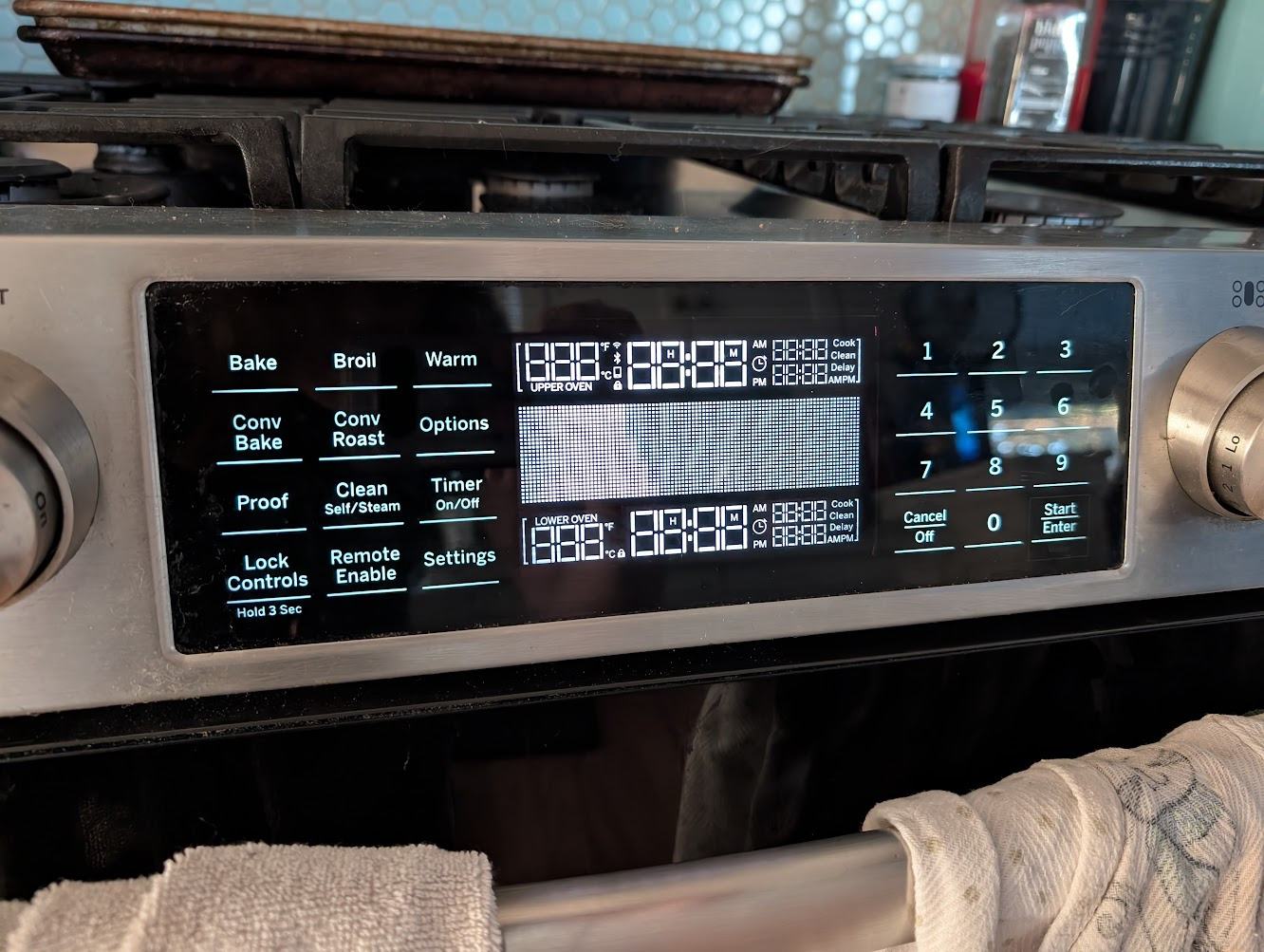
The oven's odd startup screen
We had been told by an electrician recently that the power line under the house going to the oven looked superficially damaged, so I double checked the voltage coming out of the outlet for the range and confirmed that it was 220 (as expected).
We suspected that the heat from the oven might have fried the display board, and so we bought part WB56X28190. It took some work to get at this piece, we had to:
- Remove the range racks
- Pull the knobs off
- Remove the knob housings
- Remove the screws that secured the metal top of the range
- Remove all of the burners
- Unscrew the burner mounts from the metal top
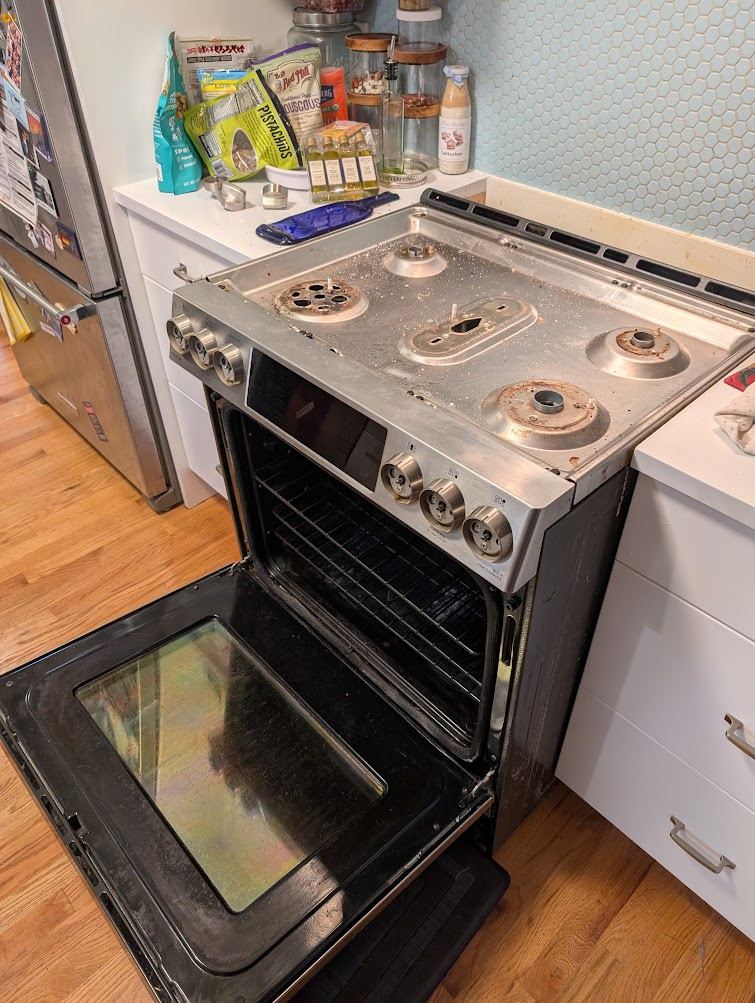
The oven with the top removed
This allowed us to pull the front panel out and access the control board directly for replacement. We installed the new one, flipped the breaker...and got the same result. So it couldn't have been that board, even though we were certain this was some electrical issue.
The solution
It turns out, this oven has two control boards! Not just the $600 one up front which was now useless for us - there was a power control board WB27X29501 mounted on the back of the oven too. My girlfriend and I did some testing of the power being delivered to the front panel, and she determined that the board was not receiving one "leg" of power that it should have been. So we thought it might have been this next.
We pulled the oven out from the wall as far as we could to access the existing board. This one required removing a lot of screws, but not too many panels at least. And we took a picture of the existing module to make sure we knew where each of the cables were supposed to go (there were a lot).
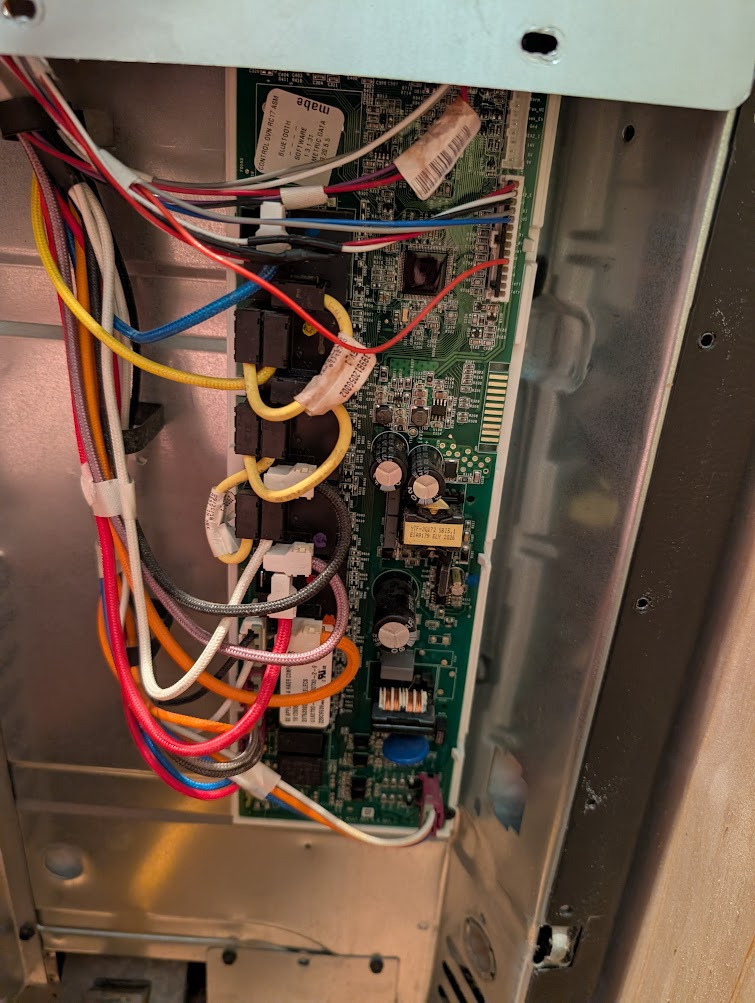
The power control board
Once that was replaced and the breaker switched back on - voilà! The oven worked again!
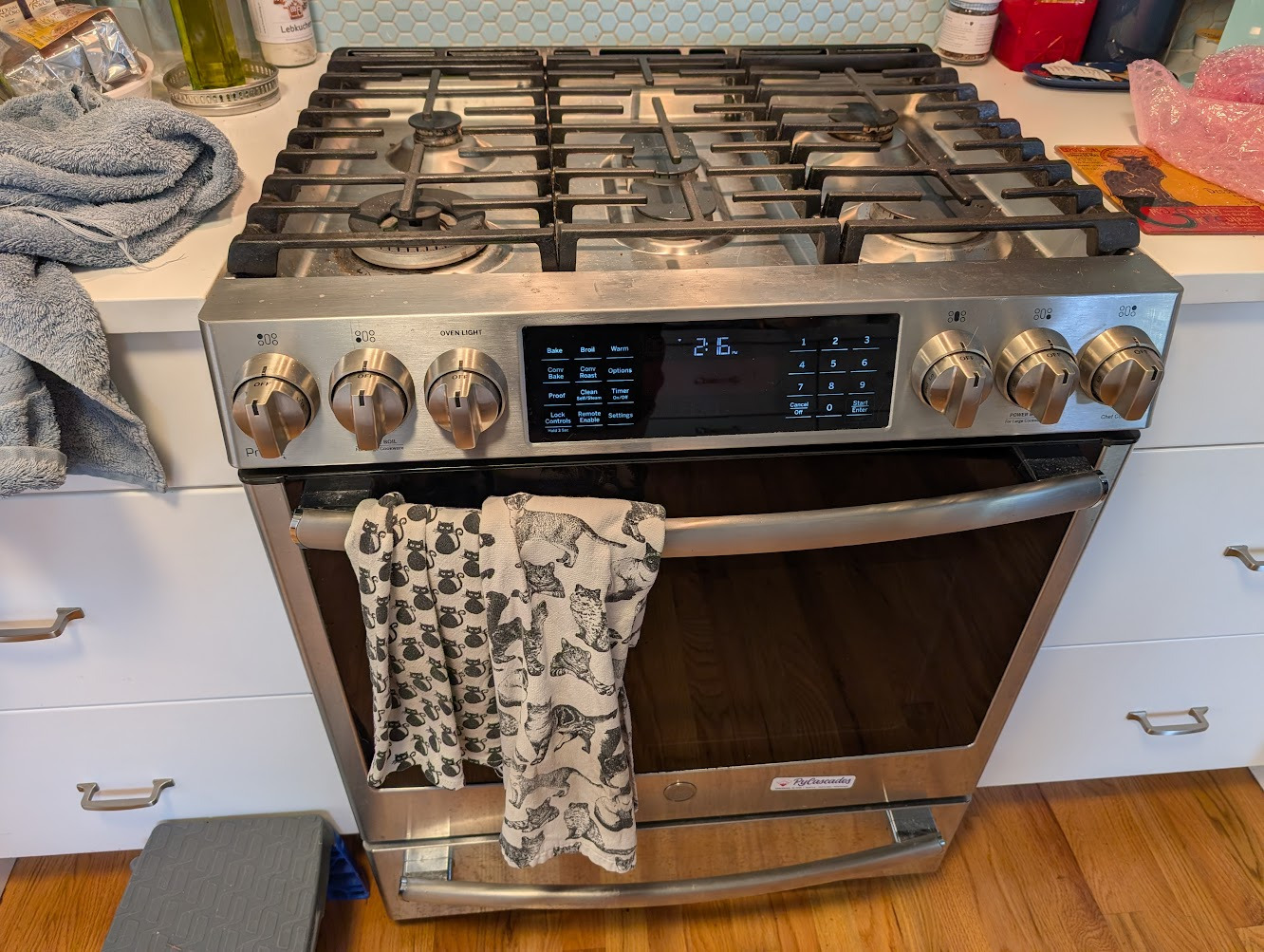
The oven working again!
Unfortunately, whatever we did to the control board made it so that the "remote enable" function does not stay on perpetually like it used to, which effectively makes it useless. But at least we have a functioning oven once more!
Self-Hosted Spotify Alternative
The Background
For many of the reasons that you might imagine, I wanted to get the hell off of Spotify. To enumerate a few of them1:
- Spotify has never had the concept of random album shuffle. As a woman who carried a Sandisk Sansa Clip mp3 player which contained her entire music collection all throughout college and who loved the random album shuffle feature of Clementine, the fact that Spotify was lacking this key feature was, in my mind, absurd. I even wrote a custom script to try and emulate this feature with my Spotify library when I had one, but it wasn't really the same; I still had to actively choose an album.
- The whole "evil CEOs doing evil CEO things" aspect of it.
- How atrocious Spotify is as a music playing app...it is clearly not written by people who enjoy listening to music.
But see, it wasn't me that I needed to convince for this! My needs were simple: have a media collection which I enjoyed, have the ability to random album shuffle, ???, profit. The real kicker was that I was on a family Spotify plan with my wife, and her music listening habits were quite different from mine. While I tend to shuffle albums and skip the ones I'm not in the mood for (doing so gives me the opportunity to encounter albums I might not explicitly pick myself), my wife Stef likes to pick a song/artist/album and have her music player find a bunch of stuff that's similar.
Spotify is actually exceptional at this particular case - they have the sonically-similar algorithm down to a recommendational science and it's hard to compete with that. But where many would throw in the towel, I saw an interesting challenge: could I stand up a self-hosted music option as appealing to my wife as Spotify? And if possible, could I make a self-hosted option appealing to other Plex users who have already curated their own collection/have their own listening desires?
Note: If you're interested in just the solution, skip to The Stack
The Constraints
Like any software system that encounters the real world, you run up against the constraints that system must conform to. If I were to spin up a music platform suitable for an exit off Spotify (and one that fit into my existing self-hosted menagerie without too much trouble), it had to conform to these constraints (requirement spec compliant with RFC 2119):
- It MUST provide a mechanism to listen via random album shuffle AND for "more like this" listening patterns (e.g. album radio, artist radio, song radio, etc.)
- It MUST include a mechanism for recommending new music
- It MUST interact with Plex and Deluge, which run on bare-metal on the target machine
- It MUST run on a Dell Optiplex (couldn't be too resource consumptive)
- It SHOULD integrate with existing private trackers (IPTorrents/IPT & Redacted/RED)
- It SHOULD allow me to easily acquire new music
- It SHOULD be Dockerized where possible
- It SHOULD integrate with Bandcamp to pull purchased music automatically
Compatibility with Stefanie
This requirement was the most important: if I couldn't stand up an experience that was as good as if not better than Spotify for the way Stef listened, then the setup was DOA. Sure, I could use the music setup myself - but then I'd still have access to my Spotify account, so why would I do that when most of my music was already there? I say "most" because notably, my favorite band Godspeed You! Black Emperor has pulled all of their music off Spotify; I'd need it for that at the very least.
When I was gathering requirements for the system with my wife (as one does), I identified a few key characteristics about her listening pattern:
- She relies heavily on artist/album/song "radio": she will tend to identify a kind of sound that she wants to hear, and have Spotify identify sonically similar music
- She likes the auto-generated "mixes" that Spotify provides: these are things like "crashout mix" or "bubblegum punk mix"
- She uses Spotify for new music discovery: both the sonic-similarity algorithms and the new release recommendations have exposed her to artists and albums she now loves
Fortunately, Plexamp looked to be very promising in this regard! Plus, it natively integrated with our existing Plex setup without any extra effort.
In early tests however, the sonic similarity recommender failed because it didn't have a whole lot of her kind of music to work with. I needed to be able to easily add a bunch of her albums so that she already had a solid collection of music she could start listening to when the time came.
Compatibility with Plex
As a family, we have been using Plex for movies and TV for several years at this point. I knew of other self-hosted music options like Jellyfin, Emby, and Kodi, but as a lifetime Plex Pass holder, I didn't want to spin up a whole other media system just for music if I could help it.
Once again, the existence of Plexamp pleased and surprised me - I felt like I had a encouraging enough start to continue.
Compatibility with other, long-standing bare-metal pieces
If there's one thing my fellow partner-in-tech Holly knows about me, it's that I love microservices; doubly so if the microservices are Dockerized. Sadly, I failed to follow my own advice when setting Plex up for the first time and ran it on bare metal. This was because running Docker on a Raspberry Pi seemed too heavy to me when I first spun this all up. When I (on Holly's advice) upgraded to a Dell Optiplex, I tried to mirror the setup to the Pi as closely as I could. That meant running Plex at the system level.
The other service I had running on the Pi was Deluge. Similarly here, I wanted to transition to the new device easily and maintain all the existing torrents I was already seeding. I moved this service over to run on bare metal on the Optiplex as well, neglecting to Dockerize it at the time (Future Me Hates Me).
Whatever future setup I wanted to have, Dockerized or not, it needed to be able to interact with both Plex and Deluge running directly on the host.
Compatibility with my screwy self-hosted hardware
If you haven't already come to this conclusion, let me make it for you: my self-hosted server was pretty janky. I had two major services running on bare metal, pulling/pushing media to three separate hard drives (named here for reference later):
- Skyros
- 2TB external USB hard drive
- Seed source and home for expendable data
- Tleilax
- 6TB external USB hard drive
- Larger home for expendable data
- Canaan
- 6TB external RAID5 hard drive array
- Home for all previous data
Each of these disks were mounted under /media/<user> on the host machine. Any future setup would need to be able to read and write to each of these 3 drives.
I also had a heuristic for where files should generally go, reflected roughly by the descriptions above:
- Movies generally go on Skyros, unless they're huge
- TV shows generally go on Tleilax
- Music goes on Canaan
This heuristic was largely grounded in the idea that TV & movie files could typically be replaced fairly easily, but music would be much more difficult to recover (for why, see the next section). Ideally, the future system would be able to automatically apply this heuristic, which I was enforcing manually for every torrent I added to Deluge by hand (by moving it to its terminal location after it finished downloading).
Modern ISPs also make network setups tricky because they require that you use their modem which often includes its own router. You can sometimes enable "bridge mode" so your preferred router can be handed your IP address. Unfortunately the model I have won't let you do that for ISP authentication, so I needed something that would work with port forwarding from the ISP router to my primary router too.
Compatibility with existing trackers
One of the first rules of being a good netizen on a private tracker is to maintain a solid ratio by seeding. For the last few years, I'd developed a significant ratio on IPTorrents and I had a manageable ratio on Redacted. It is notoriously difficult to maintain a good ratio on RED if you're trying to use it as a primary source of your music. Similarly to where my files landed after they were downloaded, I also had a heuristic for where my files came from based on these conditions:
- Always check IPT first. Pull it from there if a "reasonable torrent" exists:
- For movies: a 1080p/2160p version that wasn't more than 15-20GB, ideally with subtitles, freeleech preferred
- For TV shows: a 1080p version that was either a full season or a "pack" of episodes, ideally with subtitles, freeleech preferred
- For music: anything available (IPT has a pretty limited music selection)
- For music, check RED next. If a reasonable torrent exists, pull only the MP3 320 version of the files (to prevent pulling my ratio down too much)
Because I didn't want to do anything to tank my ratio on RED and I wanted to be careful with how much disk space I was consuming, it was crucial that this system did not automatically download content under any conditions. I wanted full control over which torrents would be downloaded and I didn't want the system making decisions for me in that regard. My worst case scenario when thinking about this was some application that would go out and download all of the music that I "wanted" and put my ratio in the trash in the process. A future system should let me be the arbiter for what's downloaded.
Compatibility with Bandcamp, across all users
I have some wonderful partners and friends who use my Plex and they each have expansive (and exceptional) music taste. Like me, they make an effort to support artists and so they have a large collection of purchased music on Bandcamp. In the past, we've ferried hard drives to each others' houses to swap music. This was tedious, and surely there had to be a better solution in the digital age! Holly and I would occasionally use Tailscale to connect to each others' networks to transfer files, which was better, but still far from seamless. This was a "SHOULD" requirement, but a system that made this more accessible would be welcome.
The Stack
I've rambled plenty now and provided more than enough context - let's talk about what I actually stood up!
Diagram to come once I get a chance to make it
The existing setup
As mentioned before, kaitain was my Dell Optiplex 9020M running Ubuntu 24.04. This had the USB-attached hard drives described above, as well as Plex and Deluge running on bare metal.
Plex
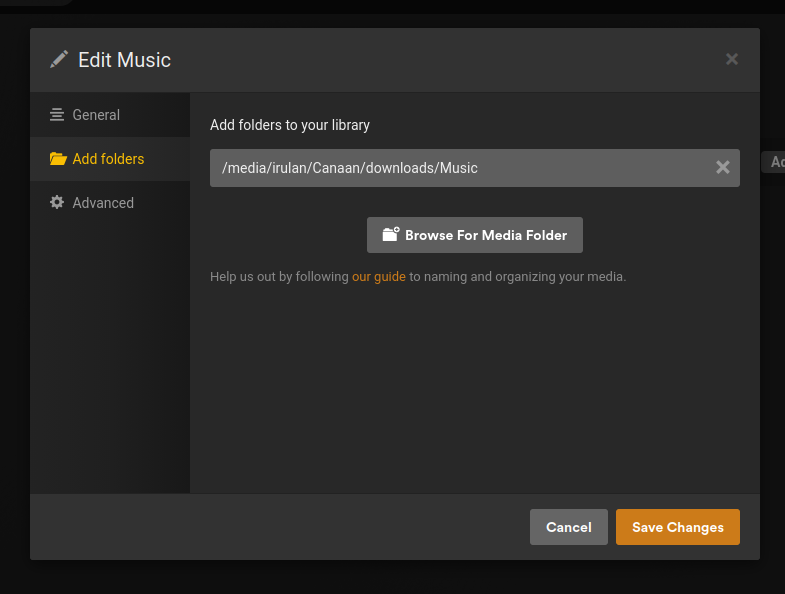
Plex was installed on this machine via apt running on port 34200. It had my movies, TV, and music libraries added from each hard drive added as their mounted paths on kaitain (i.e. /media was what's mounted for standard users):
You can access Plex directly on the machine using the host & port (e.g. https://kaitian.local:32400), but Plex also provides external access via their servers. I had mixed success reaching my Plex library outside of the house, but I realized this was due to the "Double-NAT" situation with my ISP's router described above. I resolved all issues I had previously had here by adding port forwarding on the ISP router to point to the router kaitain was connected to.
Besides the Double-NAT fix and enabling automatic library updating when a change was detected, nothing else needed adjustment with the Plex setup.
Deluge
Deluge was also installed via apt, with the deluge-web interface pointing at port 8112. I could use the web UI at kaitain.local (e.g. http://kaitain.local:8112). Because it was installed on bare metal, Deluge also accessed the media paths directly on disk (/media/*)
My previous process involved the following: When I found torrents (by hand) on various trackers that I wanted to download, I'd download the torrent file and then add it to the web UI client. Once a download was done, I'd move the download folder via the web UI to the mounted drive within one of the library folders that Plex was monitoring. Then it'd show up in the Plex app ready to view. Lots of manual intervention required here!
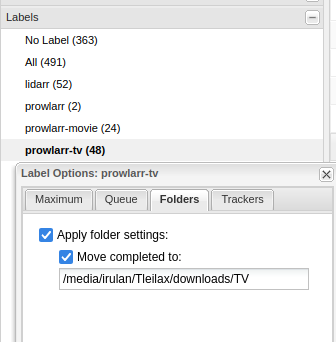
The primary change I made here was enabling the label plugin. This lets you apply labels to certain torrents which will then automatically move the downloaded files to a different location once the torrent was complete. The Servarr (*arr) apps discussed below can also be set up to apply labels based on media type, which was perfect for my case. TV gets one label (prowlarr-tv), movies another (prolarr-movie), and music a third (lidarr).
In order to have this plugin persist across reboots, you need to make the following to ~/.config/deluge/core.conf:
// Add the "Label" plugin to this list
...
"enabled_plugins": ["Label"],
...
Prowlarr (TV/movies/music)
Prowlarr (part of the Servarr family of applications) serves as the primary source of truth for "indexers". Indexers in Prowlarr are interfaces that contributors have written to interact with various private and public tracking sites. As of writing, there are over 600 indexers for sites like IPTorrents, Redacted, Orpheus, Kickasstorrents, and even the Internet Archive!
The nice part about Prowlarr is that it lets you define these indexers once, and then propagate them to all the other *arr apps. This meant that one could define the IPTorrents indexer within Prowlarr and manage it in one place. While my current setup only uses one other *arr (Lidarr), this is still useful for me because you can search for torrents across your indexers directly within Prowlarr. This is made possible by defining a "Download Client" within Prowlarr itself. Doing this isn't strictly required when using the full *arr suite, because each app will need its own download client configured.
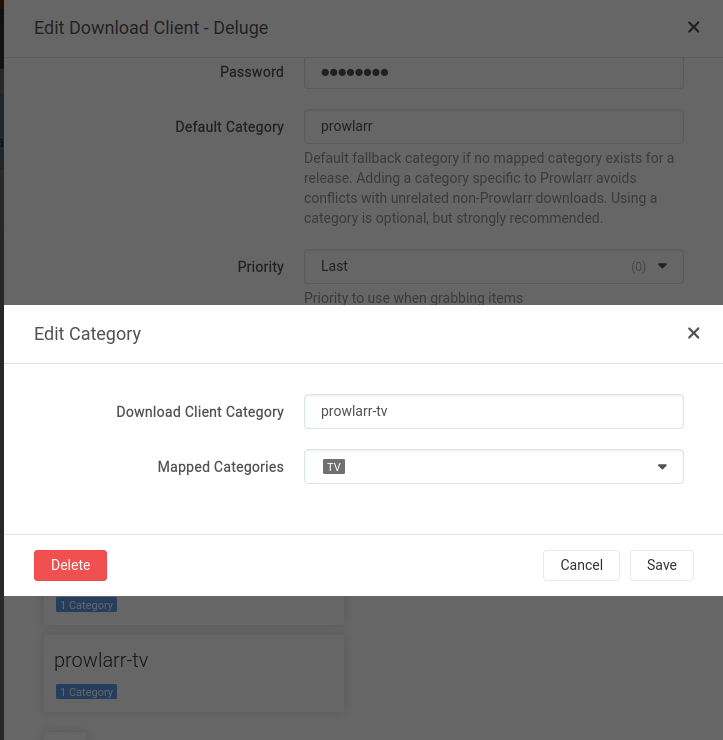
Unlike Radarr and Sonarr, Prowlarr is agnostic to what it's downloading; it doesn't have any special provisions or handling for different media types out of the box. I was able to use the Deluge client's "mapped category" feature within Prowlarr to apply tags in Deluge to torrents that come from certain upstream categories. This then applied the prowlarr-tv tag for torrents that IPT classified as "TV":
I had initially spun up Radarr and Sonarr as well, but I opted to go through Prowlarr exclusively for TV/Movies because it gave me much more heuristic control without having to configure two additional services & download profiles. I wanted to avoid at all costs automated downloads, and it seemed to me like Radarr/Sonarr were geared towards automatically pulling the highest quality version of media it could find (not what I wanted!!).
All of the *arrs also let you define a priority for indexers and download clients. Under the more standard use-cases this would direct Prowlarr to attempt to download something from the indexer with the lowest priority, only trying other sources if the first was unavailable. This concept applies to things like file format, resolution, audio compression, etc. within each of the more targeted *arrs. I didn't use this feature in Prowlarr much because I was only ever downloading content from IPT.
Since Prowlarr was now sending torrents directly to Deluge, Deluge labels were handling where each of the torrents went depending on category, and Plex was watching the library folders for new content, which now meant that I had a one-click solution for getting TV & Movies into Plex!
compose.yml
services:
  prowlarr:
    container_name: prowlarr
    image: ghcr.io/hotio/prowlarr
    # Host network mode specifically so Prowlarr can talk to Plex/Deluge on localhost
    network_mode: host
    restart: unless-stopped
    # Port declaration not needed for host network mode
    # ports:
    #   - "9696:9696"
    environment:
      # Match the host user to prevent permissions issues
      - PUID=1000
      - PGID=1000
      - UMASK=002
      - TZ=America/Los_Angeles
    volumes:
      # Persist the configuration on-disk
      - /home/irulan/programs/prowlarr/config:/config
Lidarr (music only)
"But Madison", you're asking, "what about the freaking music??". That's where Lidarr comes in! Lidarr is the member of the *arr family that handles music library management. There's a bunch of specific properties involved when dealing with music that movies & TV simply do not have to contend with:
- Way way way more content, since publishing music is much more accessible to people than publishing a TV show or movie
- The concept of "release groups" rather than a single release (i.e. editions of an album)
- Different conceptual containers for music (e.g. album, EP, compilation, single, etc.)
- Audio containers/quality mattering more (e.g. mp3 vs ogg vs flac)
Basics
Lidarr gives users lots of knobs to configure all of these options, which was exactly what I was looking for. Lidarr could scan my existing library and attempt to match all of the artists/albums that I already had, and also provided me a means for adding new music that I wanted to acquire. Just like Prowlarr, I could then search for that music within my configured indexers (in this case IPT, RED2, and Soulseek/SLSK, which I'll talk about more below).
Ostensibly, you should be able to search for an artist or album directly in Lidarr to add it to your media library. At the time I was setting this up, though, Lidarr was experiencing a pervasive and catastrophic failure of its metadata API. Despite the advisement of the Lidarr contribution team to wait for setting up new instances until after this issue was resolved, I chose to continue trying to get things stood up. Mostly this meant that I needed to add the MusicBrainz release group IDs directly for the albums I wanted. Finding albums and artists has since become much more intuitive now that the issue has been fixed upstream.
Monitoring
Lidarr has a notion of "monitoring", which defines what artists & albums it should be automatically looking for and what it can ignore. The documentation on how this interacts with the system and what effect that has was sparse, and my own understanding was fairly rudimentary. Particularly while the metadata service issue was ongoing, I would add artists and have only a handful of their albums show up, even when more entries existed in MusicBrainz. I initially disabled all monitoring so Lidarr wouldn't download anything without my intervention. I realized later that I could disable RSS on the RED indexer and use it exclusively for interactive searches, which let me feel much more comfortable about automatic downloads from IPT/SLSK.
Configuration
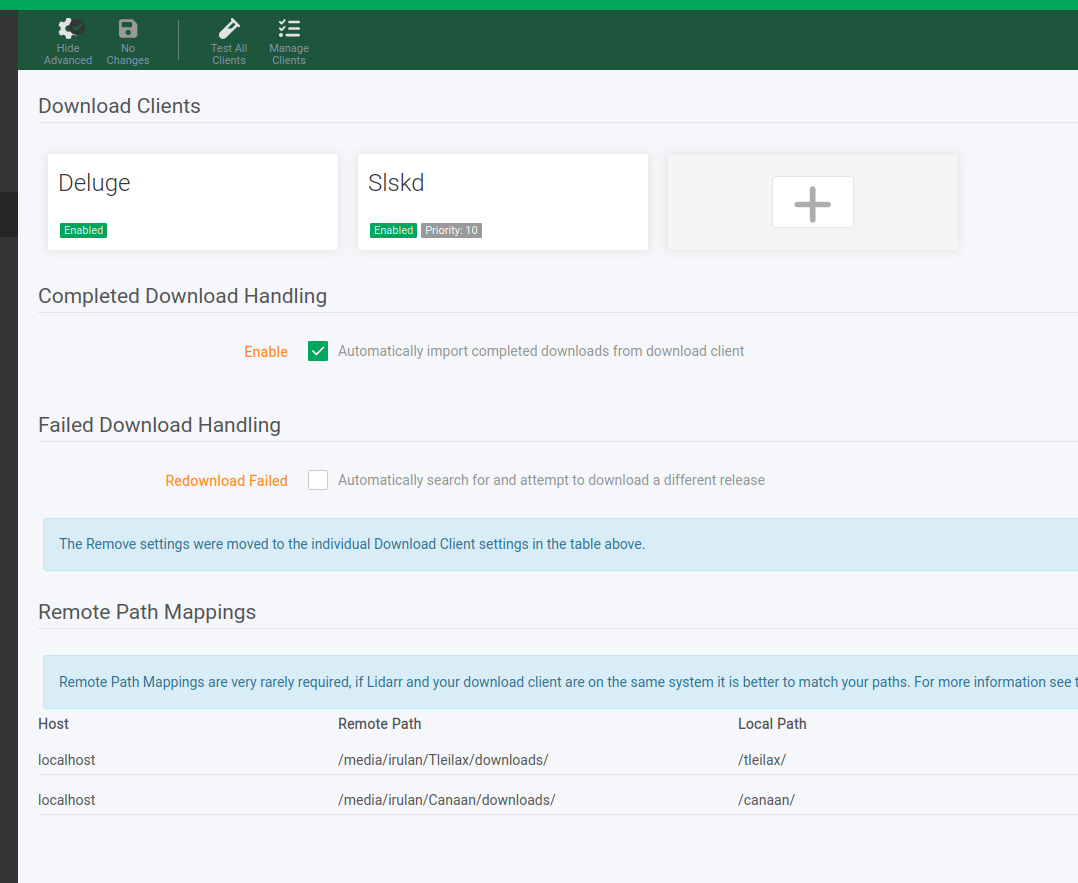
Before setting up a download client, I needed to map my system media folders to paths that the Dockerized Lidarr could read (described in the quick start guide as root folder setup). The drives were on the machine as /media/irulan/*, and so I mounted /media/irulan/Canaan/downloads onto /canaan within the container and added /canaan/Music as the root folder. Lidarr will store the downloaded music in one location (configured for each download client) and then copy the music to the media folder. Lidarr forbids you from using the same folder for downloads & media, so I enabled the "Hardlinks instead of Copy" advanced option to prevent Lidarr from creating two physical copies on disk.
Similar to how I was mapping host folders to directories within the container, I also needed to map those containers back to host folders for the download clients. This would tell Deluge/SLSK to put files in the right location, but still have them be accessible to Lidarr.
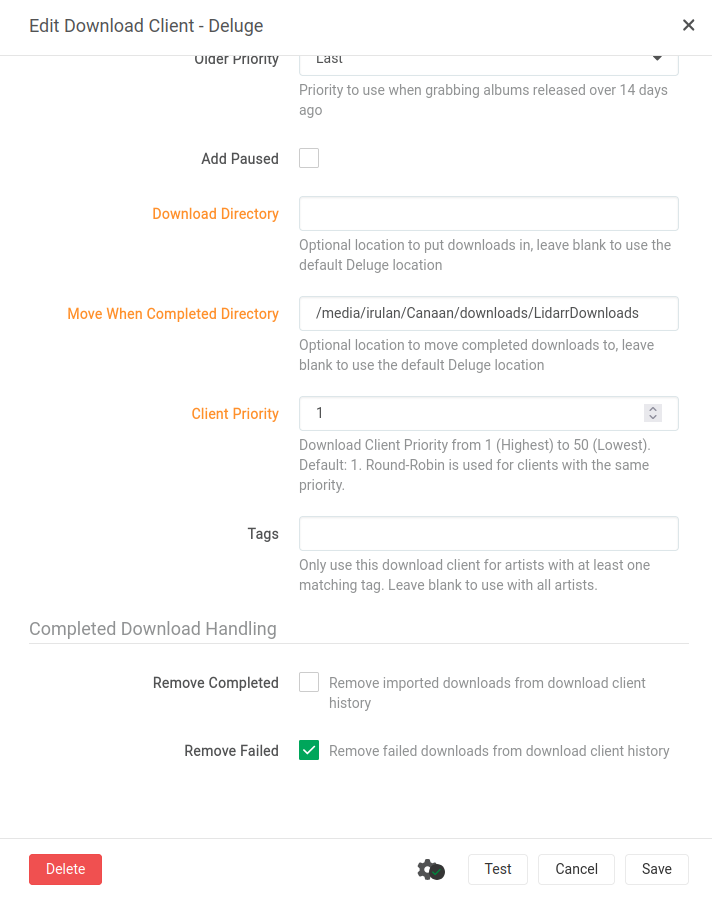
Soulseek configuration to follow
The final product of this setup was that I can add an album to Lidarr and use Lidarr's interface to search across IPT, RED, and SLSK, all while seeing the file size, quality, and source ordered by the priority that I set. Easy music acquisition was now possible!
compose.yml
services:
  lidarr:
    # The "pr-plugins" tag is required for use with slskd
    image: ghcr.io/hotio/lidarr:pr-plugins
    container_name: lidarr
    # Similar to Prowlarr - needed the ability to talk to localhost
    network_mode: host
    restart: unless-stopped
    # ports:
    #   - "8686:8686"
    environment:
      # Same user management settings
      - PUID=1000
      - PGID=1000
      - UMASK=002
      - TZ=America/Los_Angeles
    volumes:
      # Aforementioned mounted volumes for the larger drives
      - /home/irulan/programs/lidarr/config:/config
      - /media/irulan/Canaan/downloads:/canaan
    extra_hosts:
      # Making this mapping explicit gives me the ability to reference Deluge/SLSK by name
      # rather than having to reference by IP
      - kaitain.local:0.0.0.0
      - slskd.kaitain.local:0.0.0.0
Slskd
I mentioned earlier how hard it is to get a good ratio on RED, and how that makes it a challenging source for downloading music - until you get established there, you have to upload as much as you download, freeleech isn't much of an option, and seeding does next to nothing. Without an easy source for new music for fleshing out the existing library for Stef, I was pretty dead in the water. More than one of my friends had mentioned Soulseek, so I decided to see if that was a viable option.
As it turns out, there's an entire Soulseek daemon you can spin up for running Soulseek headlessly via Docker, and a whole plugin for connecting that daemon to Lidarr as both an indexer and a download client! This was the final missing piece for me - I could easily find and share music through Soulseek's P2P network and manage it all within Lidarr alongside my other configurations. Of course, downloads from SLSK are much less curated by nature and will fail at a higher rate, but I could acquire with impunity knowing that I had no ratio which would be affected (and knowing that I was sharing my whole library with others, too!).
Configuration
Within the slskd container, I had set up separate folders for downloads/incompletes. Lidarr would move the completed downloads to the final target folder /media/irulan/Canaan/downloads/Music, which also served as the folder I exposed within slskd for sharing. That way any new music I acquired would immediately be available for searching by other SLSK users.
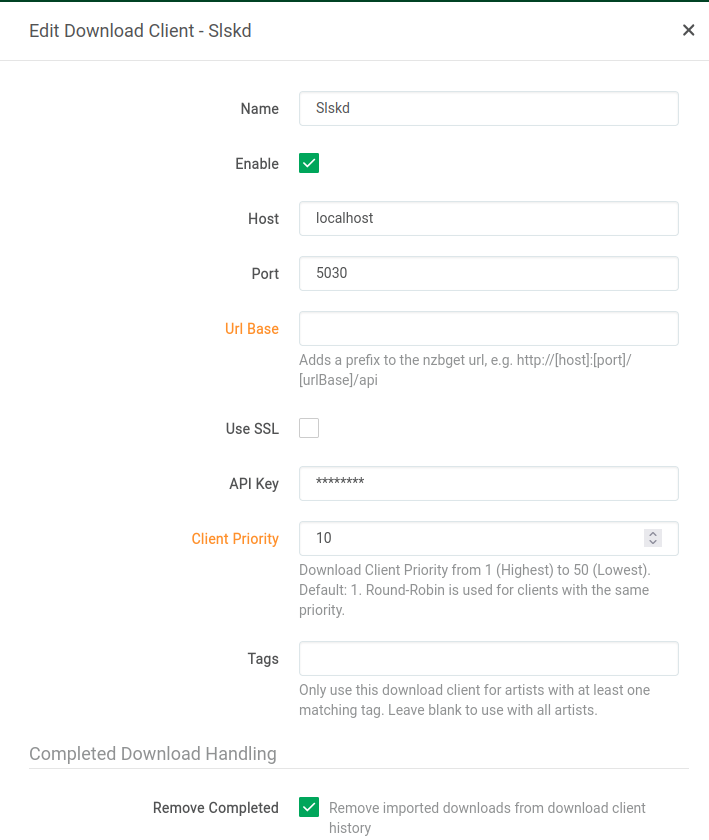
The hardest part with SLSK was getting everything connected within Lidarr. Once I had slskd running as a separate container and Lidarr running on the plugins branch, I had to set up both the indexer and the download client. Here's the relevant settings for both:
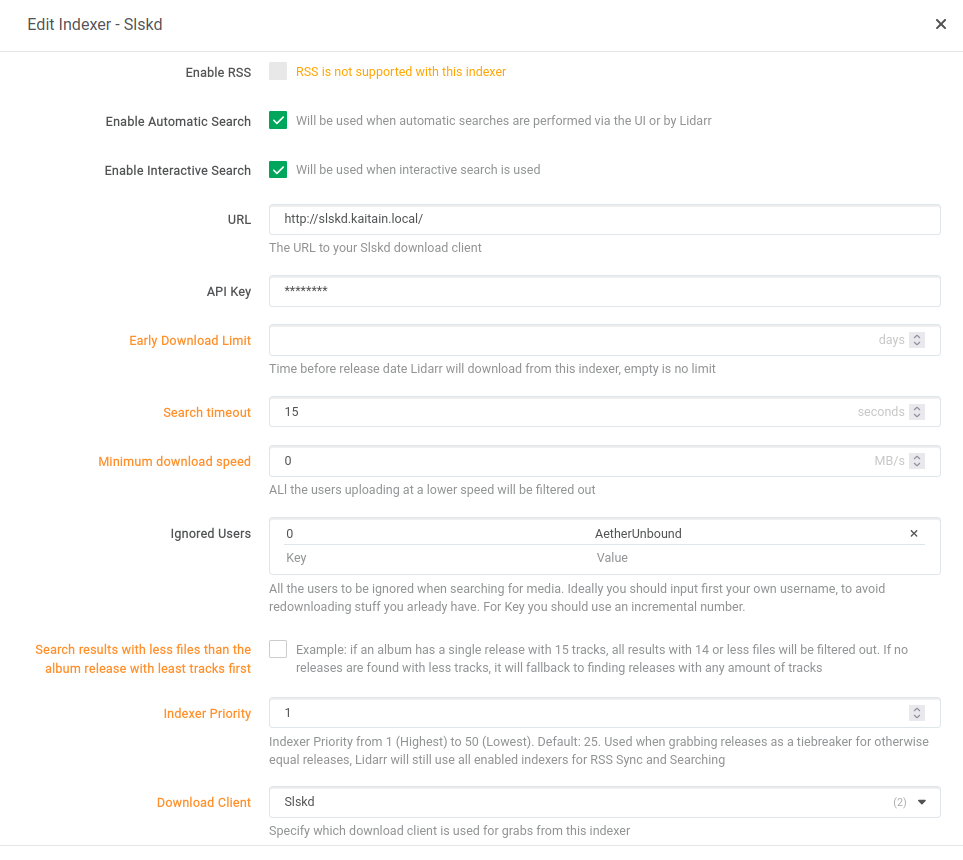
Note that I was able to use the slskd.kaitain.local URL because of the Lidarr extra_hosts configuration mentioned earlier. I would also recommend increasing the search timeout and dropping the minimum download speed - the defaults were too restrictive initially and SLSK wasn't coming back with any results within Lidarr.
Instructions for setting up an API key can be found in the slskd repository docs.
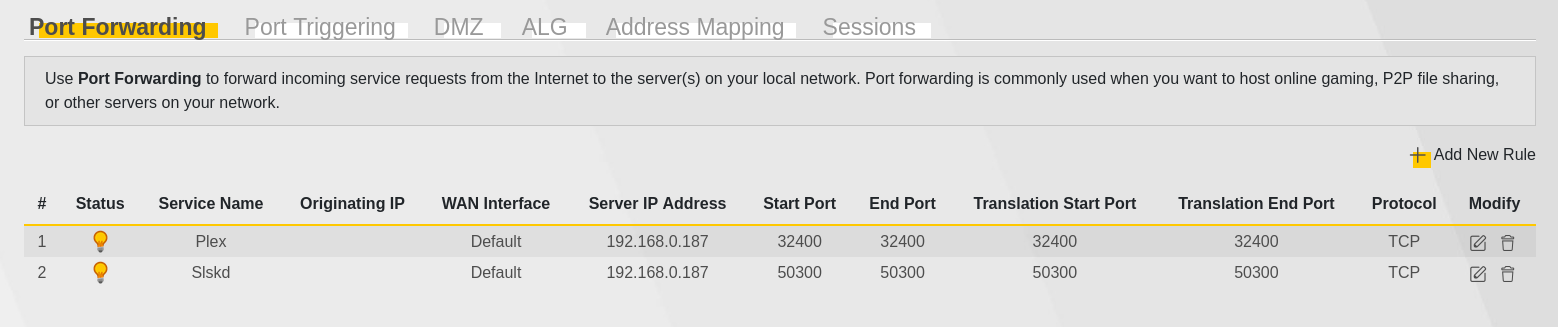
For the same double-NAT reason that I had to add port-forwarding for Plex, SLSK also required me to forward port 50300 to the primary router I used.
Testing
I wasn't sure if slskd was actually exposing my library in headless mode, so I tested this by downloading the Soulseek QT application on my laptop and logging in as a separate user. If you login under the same username, you'll disconnect yourself from the headless machine since you can't be logged in on more than one machine. From there I was able to search for my headless user account and attempt a download to confirm it was live.
compose.yml
services:
  slskd:
    image: slskd/slskd
    container_name: slskd
    # Host mode for similar reasons
    network_mode: host
    restart: unless-stopped
    # ports:
    #   - "5030:5030"
    #   - "5031:5031"
    #   - "50300:50300"
    environment:
      # Same user ID mapping
      - PUID=1000
      - PGID=1000
      - UMASK=002
      - TZ=America/Los_Angeles
      # Allow SLSKD to be managed by Lidarr
      - SLSKD_REMOTE_CONFIGURATION=true
      # Folder configuration, note that Lidarr handles moving the completed files to the shared directory
      - SLSKD_DOWNLOADS_DIR=/canaan/SlskDownloads
      - SLSKD_INCOMPLETE_DIR=/canaan/SlskIncomplete
      - SLSKD_SHARED_DIR=/canaan/Music
      - SLSKD_SHARE_CACHE_STORAGE_MODE=disk
      - SLSKD_UPLOAD_SLOTS=20
      - SLSKD_UPLOAD_SPEED_LIMIT=10000
      - SLSKD_SLSK_USERNAME=${SLSKD_SLSK_USERNAME}
      - SLSKD_SLSK_PASSWORD=${SLSKD_SLSK_PASSWORD}
      - SLSKD_UMASK=000
      - SLSKD_FILE_PERMISSION_MODE=777
      # Exclusion for bandcampsync
      - SLSKD_SHARE_FILTER=bandcamp_item_id.txt$
    volumes:
      - /home/irulan/programs/slskd/config:/app
      # Drive mounting
      - /media/irulan/Canaan/downloads:/canaan
Last.fm
With music acquisition covered, I now needed a solution for music recommendation. Initial research lead me to Last.fm - this seemed to be the go-to approach for tracking music listens and generating recommendations. I explored other micro-services I could stand up to capture scrobbles, but all of them required that the users on my Plex had their own Plex accounts. Until now, I had just been creating local users for everyone. That also meant that all of their scrobbles would be linked to my Plex account. You can add other Plex users to your Plex Home and anyone in your Plex Home also has access to your Plex Pass features if you have them! So I had all of the other users (including Stef) make a new Plex account themselves and added those accounts to my Plex Home instead of having managed accounts under my name. This had the added benefit of letting them log in themselves on their own devices without needing my password.
Once everyone had their own account, I directed them to link their scrobbles directly to Last.fm via Plex itself. In order to get recommendations for my wife, I had her log into her Last.fm account on my computer. That way I could see her recommended albums based on her listening habits and periodically pull new music in for her.
Bandcamp
Myself and others using the Plex also had a ton of music on Bandcamp. That was actually the primary listening mechanism for one of my friends, although the app & listening experience left a lot to be desired. Fortunately, bandcampsync offered an easy way to set up a very simple sync mechanism between each of our libraries and my media server. All I had to do was get each person to give me the cookies.txt content for their accounts and I could spin up a container for them. By default the application checks Bandcamp once a day for new music, but it will also check on container startup so getting newly-purchased albums was as easy as restarting the Docker container.
compose.yml
services:
  madison:
    container_name: bandcampsync-madison
    # This didn't need any ports or network settings, since it's only downloading files
    image: ghcr.io/meeb/bandcampsync:latest
    restart: unless-stopped
    environment:
      - TZ=America/Los_Angeles
      - PUID=1000
      - PGID=1000
      - RUN_DAILY_AT=3
    volumes:
      # User-specific mount for auth, media library mount for downloads
      - /home/irulan/programs/bandcampsync/config/madison-cookies.txt:/config/cookies.txt
      - /media/irulan/Canaan/downloads/Music:/downloads

  <other-user>:
    # Same configuration just different mounts/names
    ...
Plexamp
With all these services set up behind the scenes, Stef needed an app for listening to the music that was 1) not as bad as Spotify at least and 2) fulfilled her listening requirements. Plexamp seemed like it would be exactly that, since it supported:
- Random album shuffle - the one Madison requirement, YAY!!!
- Artist/album/song radio - sonically/artistically similar music could be queued from any level
- Mix builders - add a bunch of artists or albums together ad-hoc and have Plexamp shuffle them
- Automatic mixes - after playing a few different artists, Plexamp would provide a few recommended mixes of 3+ artists on the home screen
- Better offline support than Spotify - downloaded files could actually be played, and the app was snappy even if it couldn't reach the network
- Lots of knobs - this is a music app for music nerds, and there are a lot of settings you can tweak to tune your experience
Extras (caddy/portainer/tautulli)
Those were the core pieces of the setup I landed on. Below are a few extra services I added either to help me manage everything or make monitoring easier.
Portainer
This is an easy-to-use UI for Docker management. Certainly the Docker CLI can be helpful, but I found this a quicker mechanism for checking logs, restarting containers, downloading new images.
# compose.yml
name: portainer
services:
  portainer-ce:
    container_name: portainer
    image: portainer/portainer-ce:lts
    ports:
      - 9443:9443
      - 9441:9000
    restart: unless-stopped
    volumes:
      - /var/run/docker.sock:/var/run/docker.sock
      - portainer_data:/data
volumes:
  portainer_data:
Tautulli
This is a fantastic application for monitoring active Plex usage and for gathering historical statistics. It's always intriguing to me to see who's watching/listening to what!
This doesn't have an associated compose.yml because I installed it on the bare metal alongside Plex itself.
Scrutiny
WebUI for smartd S.M.A.R.T monitoring - with multiple drives, and not all of them RAID arrays, I wanted to be able to check on the health of each individual drive.
# compose.yml
# https://github.com/AnalogJ/scrutiny/blob/master/docker/example.hubspoke.docker-compose.yml
services:
  influxdb:
    restart: unless-stopped
    image: influxdb:2.2
    ports:
      - "8086:8086"
    volumes:
      - "./influxdb:/var/lib/influxdb2"
    healthcheck:
      test: ["CMD", "curl", "-f", "http://localhost:8086/health"]
      interval: 5s
      timeout: 10s
      retries: 20

  web:
    restart: unless-stopped
    image: "ghcr.io/analogj/scrutiny:master-web"
    ports:
      - "8085:8080"
    volumes:
      - "./config:/opt/scrutiny/config"
    environment:
      SCRUTINY_WEB_INFLUXDB_HOST: "influxdb"
    depends_on:
      influxdb:
        condition: service_healthy
    healthcheck:
      test: ["CMD", "curl", "-f", "http://localhost:8080/api/health"]
      interval: 5s
      timeout: 10s
      retries: 20
      start_period: 10s

  collector:
    restart: unless-stopped
    image: "ghcr.io/analogj/scrutiny:master-collector"
    cap_add:
      - SYS_RAWIO
    volumes:
      - "/run/udev:/run/udev:ro"
    environment:
      COLLECTOR_API_ENDPOINT: "http://web:8080"
      # Changed this to my desired hostname
      COLLECTOR_HOST_ID: "kaitain"
      # If true forces the collector to run on startup (cron will be started after the collector completes)
      # see: https://github.com/AnalogJ/scrutiny/blob/master/docs/TROUBLESHOOTING_DEVICE_COLLECTOR.md#collector-trigger-on-startup
      COLLECTOR_RUN_STARTUP: true
    depends_on:
      web:
        condition: service_healthy
    devices:
      # All of the drives that I wanted Scrutiny to monitor
      - "/dev/sda"
      - "/dev/sdb"
      - "/dev/sdc"
      - "/dev/sdd"
      - "/dev/sde"
Simon
A lightweight, all-in-one system monitor with Docker support, live metrics, alerts, and full file management. I had looked into monitorix for this purpose but it had to be installed on bare-metal and I wasn't the biggest fan of the more outdated interface. Simon is both fast and pretty, and the contributor is quite friendly.
services:
  simon:
    image: alibahmanyar/simon
    hostname: simon
    restart: unless-stopped
    ports:
      - "30000:30000"
    environment:
      SIMON_PASSWORD_HASH: "[redacted]"
    volumes:
      - /sys:/sys:ro
      - /var/run/docker.sock:/var/run/docker.sock:ro
      - /:/fs:ro
      - ./simon-data:/app/simon-data
Wrapperr
Because who doesn't enjoy Spotify Wrapped? This tool integrates with Tautulli to give a yearly statistics summary similar to Spotify Wrapped. A cute little addition!
services:
  wrapperr:
    container_name: wrapperr
    # To talk directly with Tautulli & Plex
    network_mode: host
    # ports:
    #     - '8282:8282'
    image: ghcr.io/aunefyren/wrapperr:latest
    restart: unless-stopped
    volumes:
      - "./config:/app/config"
Caddy
This was the "extra" service I'm most proud of. Trying to remember all of the ports for each individual service, especially when I have practically a dozen (and with all the *arr family services using the same pattern of 8686/9696/7878/etc.), was a nightmare. I wanted a way to easily access the services by name on both my local network and via Tailscale. In comes Caddy! With Caddy as a reverse proxy running on kaitain, I'm able to convert requests like http://deluge.kaitain.local to http://kaitain.local:8112 or http://kaitain/lidarr/ to http:kaitain:8686 (for Tailscale's magic DNS, which doesn't allow additional subdomains).
For the <subdomain>.kaitain.local addresses, this did require an entry in my /etc/hosts file on my laptop:
192.168.0.<kaitain-subnet-addr> portainer.kaitain.local <service>.kaitain.local
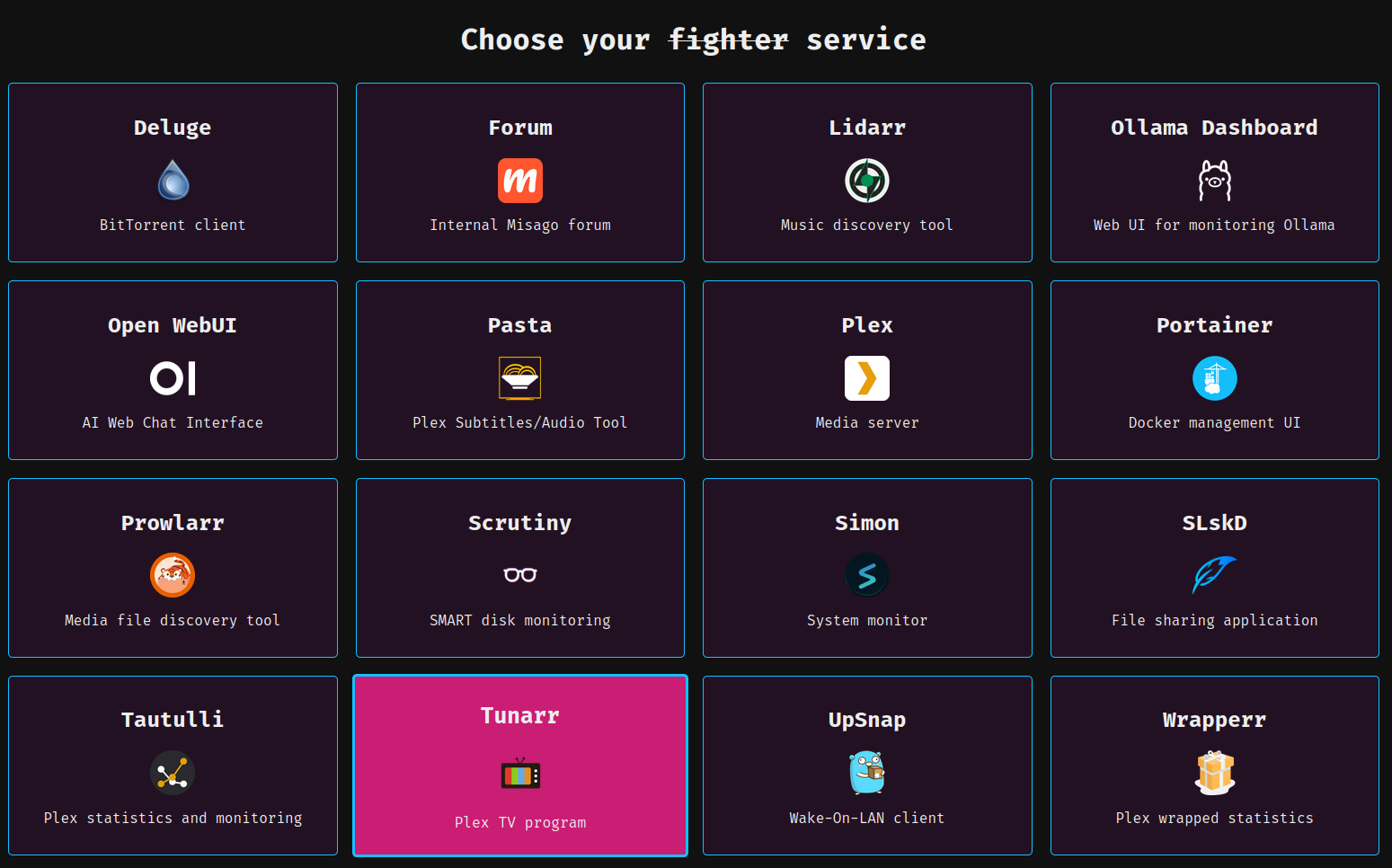
The non-.local Tailscale references work from any device with Tailscale installed and running, including my phone, which means that I can jump onto Lidarr and add new music while I'm out and about. I won't share the Caddyfile directly because I have a script generate it based off a service mapping. With Holly's help, I was also able to set up a similarly-generated landing page for all the services available on the homelab:
update_service_list.py
#!/usr/bin/env python3

import sys
import argparse
from pathlib import Path

SERVICE_MAPPING = {
    'deluge': 8112,
    'lidarr': 8686,
    'plex': 32400,
    'portainer': 9441,
    'prowlarr': 9696,
    'scrutiny': 8085,
    'simon': 30000,
    'slskd': 5030,
    'tautulli': 8181,
    'wrapperr': 8282
}
CADDY_DIRECTORY = Path(__file__).parent


def generate_caddyfile(dry_run: bool = False):
    """Generate Caddy configuration file from template based on service port mappings."""
    # Get paths to template and output files
    template_path = CADDY_DIRECTORY / "conf/Caddyfile.tmpl"
    caddyfile_path = CADDY_DIRECTORY / "conf/Caddyfile"

    # Read template file
    if not template_path.exists():
        raise FileNotFoundError(f"Template file {template_path} not found")

    template = template_path.read_text()

    # Escape curly braces in the service list and path block
    services_list = ("""
    handle_path /%s/* {
        import forward %d
    }""" % (service, port)
                     for service, port in SERVICE_MAPPING.items()
                     )
    services_list = "\n    ".join(services_list)

        # Format the paths block with proper spacing and docstring
    paths_block = ("""
http://%s.{$SERVERNAME}.local {
    import service %d
}""" % (service, port)
                   for service, port in SERVICE_MAPPING.items()
                   )

    paths_block = "\n".join(paths_block)

    # Replace placeholders in template while preserving Caddy syntax
    formatted_template = template % {'services': services_list, 'paths': paths_block}

    # Write output to file or print
    if dry_run:
        print(formatted_template)
    else:
        if caddyfile_path.parent.exists():
            caddyfile_path.write_text(formatted_template)
            print(f"Successfully wrote Caddyfile to: {caddyfile_path}")
        else:
            raise FileNotFoundError(f"Output directory {caddyfile_path.parent} does not exist")


if __name__ == "__main__":
    parser = argparse.ArgumentParser(description='Generate Caddy configuration file')
    parser.add_argument('-d', '--dry-run', action='store_true',
                        help='Dry run mode: only print the output')
    args = parser.parse_args()

    try:
        generate_caddyfile(dry_run=args.dry_run)
    except Exception as e:
        print(f"Error generating Caddyfile: {e}", file=sys.stderr)
        sys.exit(1)
Caddyfile.tmpl
{
    auto_https disable_redirects
}

(service) {
    reverse_proxy 192.168.50.235:{args.0}
}

(forward) {
    redir * http://{host}:{args.0}
}

# Default to heard
http://localhost, http://{$SERVERNAME}.local {
    log
    respond "pong"
}

http://{$SERVERNAME}.{$TAILNET_DNS}, http://{$SERVERNAME} {
    log

    # Unescape and preserve Caddy syntax for services
    %(services)s
    respond "pingers"
}

%(paths)s
Constraints Fulfilled
Looking back on the initial list of constraints:
- It MUST provide a mechanism to listen via random album shuffle AND for "more like this" listening patterns (e.g. album radio, artist radio, song radio, etc.)
- ✅ Plexamp listening functionality
- It MUST include a mechanism for recommending new music
- ✅ Integration with Last.fm via Plex
- It MUST interact with Plex and Deluge, which run on bare-metal on the target machine
- ✅ Lidarr/Prowlarr/Slskd all able to interact with Plex/Deluge while Dockerized
- It MUST run on a Dell Optiplex (couldn't be too resource consumptive)
- ✅ All services are lightweight enough to run on one machine
- It SHOULD integrate with existing private trackers (IPTorrents/IPT & Redacted/RED)
- ✅ Lidarr/Prowlarr had indexer integrations for both
- It SHOULD allow me to easily acquire new music
- ✅ Lidarr provides a UI for downloading music & automatically adding to Plex
- ✅ Lidarr + Slskd for high-volume P2P music acquisition
- It SHOULD be Dockerized where possible
- ✅ Most services Dockerized
- It SHOULD integrate with Bandcamp to pull purchased music automatically
- ✅ Bandcampsync made this seamless
The Result
I kept Stef informed about the progress while I set all this up - it felt like the digital version of a "car in the garage" that one goes out to on quieter nights tinker with. Once I felt it was in a good place and I had set Stef up with a Plex account, I asked her to try out the Plexamp app exclusively as her music listening app. I showed her around the app and how to play what she liked, and over time I could see her streaming music when I looked at statistics in Tautulli. I checked in with her a few times to see what she liked and didn't about Plexamp. Mostly, I was just happy to see that she was giving it a shot.
Then, a little over a month later, she messaged me apropos of nothing:
"I think I'm going to cancel my Spotify subscription unless you think I should keep it?"
Music (heh) to my ears!! With all the pieces in place, I had done it: I had provided a music platform enticing enough that Stef was ready to kick Spotify to the curb. I was overjoyed, what a success!
Now nearly a year on, myself, Stefanie, and a few friends have been using Plexamp as our primary listening application (backed by the homelab). We've been off Spotify since October 2025 and it has been such a relief, as that ecosystem felt like it was only getting worse. It has been wonderful to have a music listening app that I actually enjoy using. Thanks for reading, if you've gotten this far - I hope some part of this post is useful for your own divestment from Spotify!
Footnotes
-
Among other reasons, the wonderful DAMAG3 also gave such a long rant about it at her most recent concert in Seattle that she wasn't able to finish her last song before the venue kicked us all out. ↩
-
I initially had the RED indexer configured at the Prowlarr level, but I found that Prowlarr wouldn't let me consistently disable RSS for that indexer. Lidarr would then start grabbing music from RED without my intervention, violating my "no automatic downloads" constraint. Having RED in Lidarr only meant I couldn't arbitrarily search against RED to download torrents, I had to add the album to Lidarr and download it from there instead. In nearly all cases (except extremely obscure albums), that was perfectly sufficient. The Lidarr-specific RED indexer also had a setting to "only download if freeleech tokens were available", which was awesome and exactly the kind of behavior I wanted. ↩
Repair on Speed Queen Dryer ATEE9AGP173TW01
I'm making this post in hopes that this record might be useful for others facing a similar issue!
The Device
- Speed Queen 27 Inch Electric Laundry Center with 3.42 cu. ft. Washer Capacity, 9 Wash Cycles, 7.0 cu. ft. Dryer Capacity, 7 Dryer Cycles and Electronic Touchpad Controls
- Model: ATEE9AGP173TW01
- Parts list
The problem
This dryer that had worked for many years would occasionally have an issue where even on timed dry with "low" heat, the heating element would go full blast (often to the point of ruining clothes). Initially this was unpredictable and inconsistent - sometimes it would be fine and other times you could tell within minutes it would overheat.
In fact, the exact problem we were facing (including down to the troubleshooting steps I mention below) are what YouTube user Jaydee describes as well in this video!
Troubleshooting
Here's what we ruled out through troubleshooting:
- Exhaust thermistor - we replaced this because it was broken, but the issue persisted
- Shorted heating element - we performed continuity tests on the heating element and all came up clean
The overheating would happen even when the dryer was in "no heat" mode. When listening to the dryer turn on, I heard a loud click from what I presumed to be the control panel relay sending power to heating element. This would happen immediately, under any heat setting. Since the washer worked fine and the control panel on the front worked fine, we presumed the issue was with the dryer output control board.
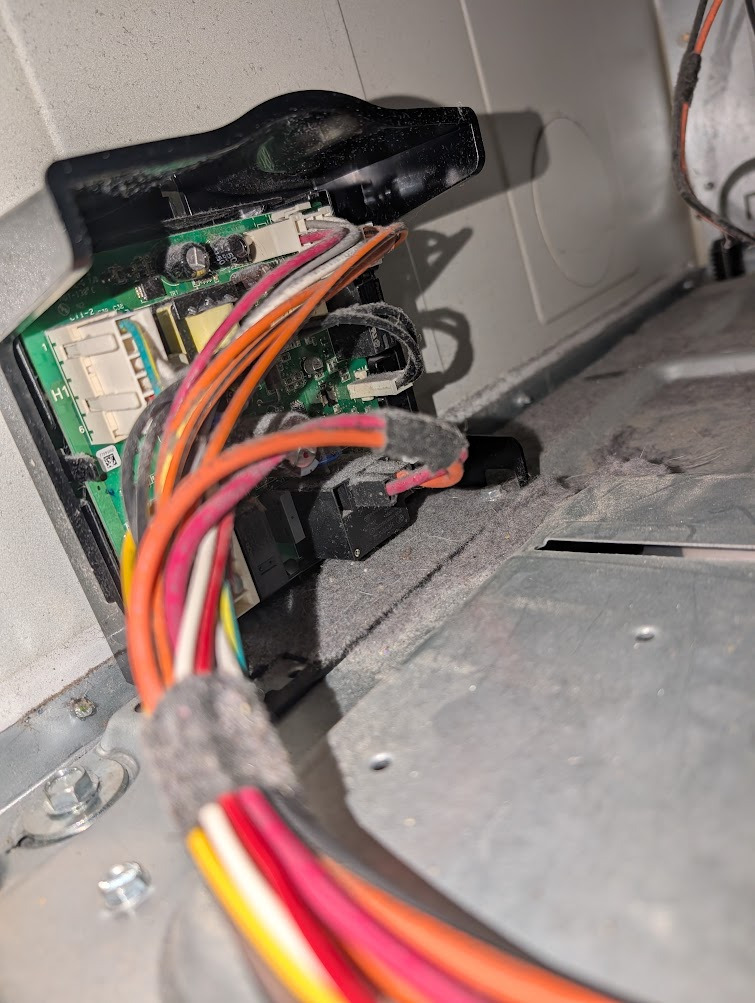
The control board we needed to replace
At this point, I was looking at the AppliancePartsPros part listing for the dryer, and identified the thing I was looking at as part 19 of this diagram. So I looked up the first part 19 I could find (D517191P) and bought it. Now tell me, dear reader, why they would have TWO PART 19s LISTED ON THE SITE?? With one being significantly more expensive than the other, and no indication on which to buy since they were both compatible with my dryer model.
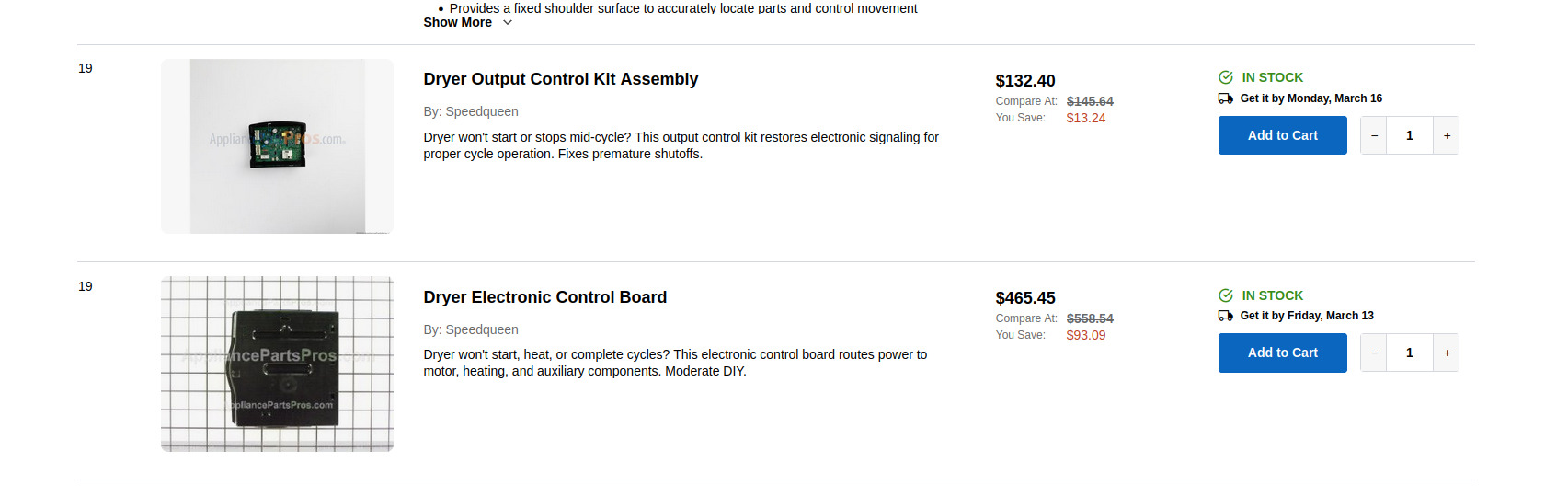
The confusing parts listing online
Sadly I didn't notice this until I actually went to install the damn thing. The cables all had similar spots on the new control board, but the board itself looked completely different than the one I pulled out.
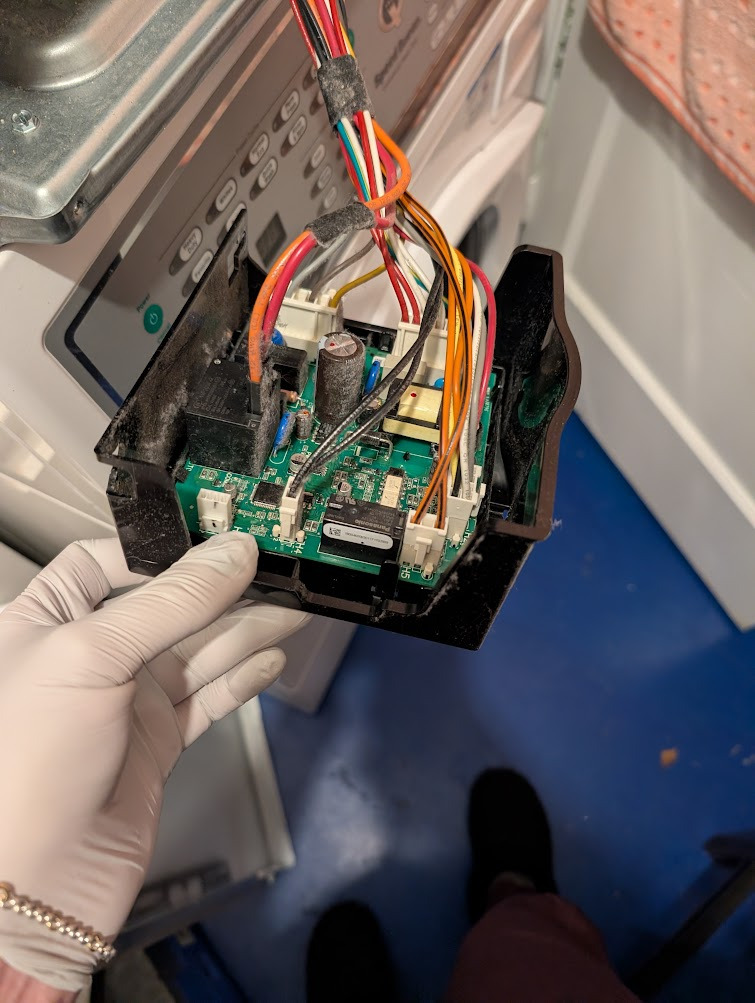
A better look at the wiring of the old board
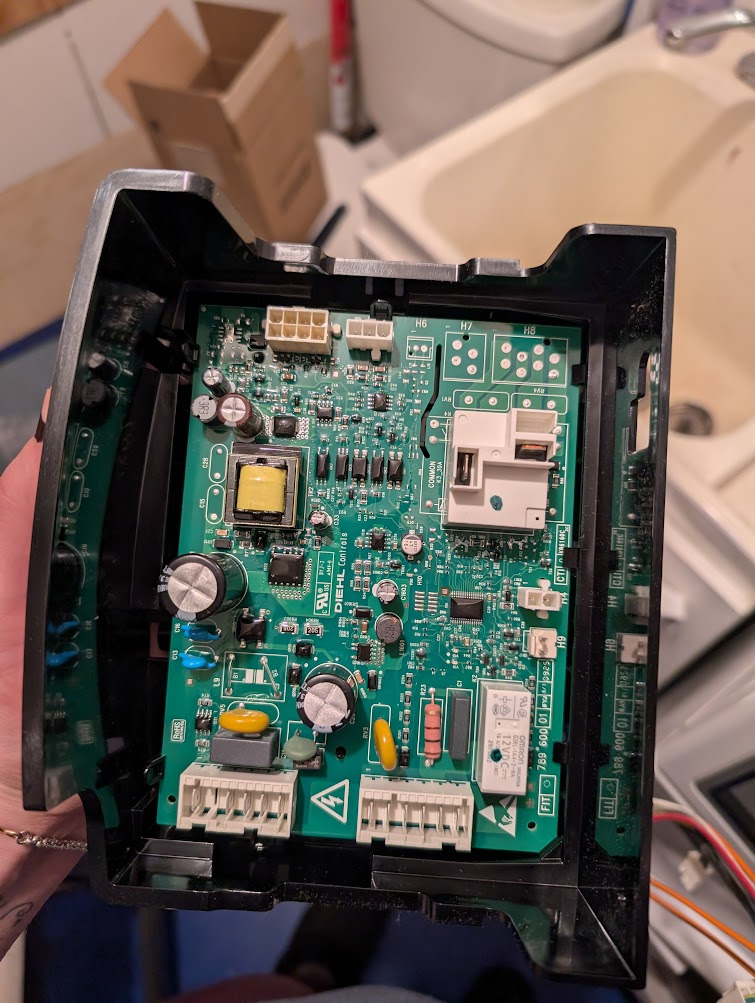
Connector positions of the wrong board
And sure enough, as soon as I turned the dryer on...

Error code from the wrong control board
It was the wrong part after all!! According to the full manual/troubleshooting guide, this is "Drive Board ID Error":
This error will be displayed if after checking for drive board/front end control compatibility it is found not to match. Unpower machine to clear code. Change front end control to one for a frontload washer.
- Wrong control has been put into machine. Verify correct part number.
- If the package the part came in has the correct part number on it, contact the distributor the part was purchased from and let them know.
The solution
What we actually needed was that second listed part, D513797P (of course the more expensive one). As soon as I installed this and plugged it all in, the thing worked like a charm! So this serves as a good note: always double check to make sure the part you're buying visually matches what's currently in the machine.